If you’ve ever tried to track your child’s football stats, you’ll know how it goes. It starts with a note on your phone after the first match. By October there are three notes, a WhatsApp message to yourself and a spreadsheet you meant to update. By Christmas, nobody can remember who scored against who.
This guide shows you what’s worth tracking, how to do it in about a minute after each match, and how to keep it going all season without it becoming a chore.
Why track your child’s football stats at all?
Most children love seeing their own numbers. A goal tally or an assists count turns “I think I’m getting better” into “I am getting better”. It gives them something to aim for on a Saturday morning and something to be proud of on Sunday afternoon.
It helps you too. When a grandparent asks how many goals they’ve scored this season, you know. When your child has a quiet patch, you can show them the run of good games before it. And at the end of the season, you have a record of the whole year instead of a blur.
What to track (and what to skip)
You don’t need to track everything. Start with the basics and add more only if you and your child enjoy it.
The essentials:
- The result and the score. Win, draw or loss, and the score.
- Goals and assists. Assists matter as much as goals, and children who set up chances often get overlooked.
- Games played. Easy to forget, but it’s the number every other stat sits on.
Worth adding when you’re ready:
- Minutes played. It shows how much game time they’re really getting.
- A match rating out of 10. Effort and attitude, not just the scoreline.
- Player of the Match, if the team gives one.
- Clean sheets, for keepers and defenders.
Skip, unless your child is keen: passes, tackles and shots. They’re hard to count accurately from the touchline, and you’ll miss the match trying.
Option 1: a notebook or spreadsheet
A notebook or spreadsheet works if you’re organised and only have one child. Draw columns for date, opponent, score, goals, assists and minutes, and fill it in after each match.
The problems come later. Totals have to be worked out by hand, seasons get mixed up, and the file lives on one device. If you have two children, or your child changes teams, it quickly gets messy.
Option 2: a football stats app
A stats app does the adding up for you. You enter the match, and the season totals, averages and form update straight away.
STATZO was built for exactly this. It’s made for grassroots football: players, parents, managers and the family on the touchline.
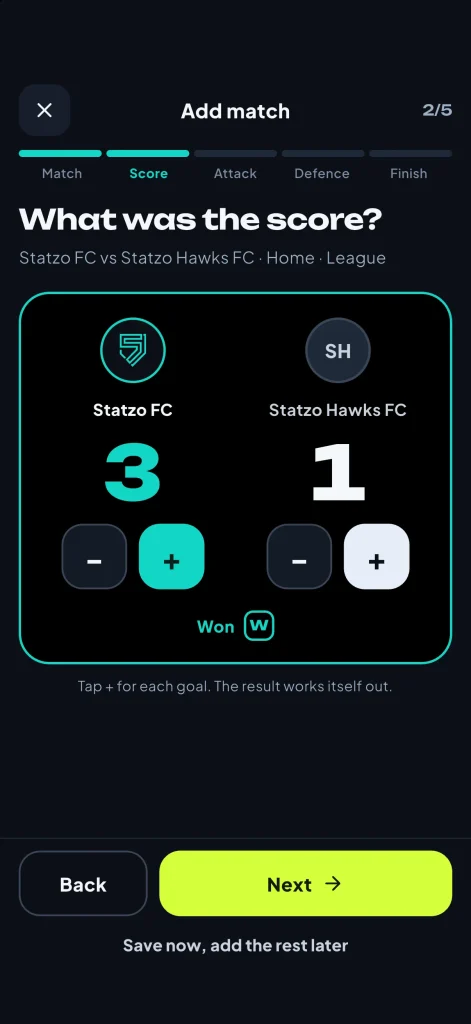
Here’s how adding a match works:
- Pick the team and the opponent. If you’ve played them before, STATZO shows your past results against them.
- Add the score. Tap + for each goal.
- Add goals and assists. Optionally, add how and where each goal went in.
- Add the extras you want: minutes, a rating, Player of the Match, cards or a note.
- Save. That’s it. About a minute, and it works with no signal at the ground.
Only the score is required, so on a busy day you can save the basics and add the rest later.
What you get back
Once a few matches are in, the Stat Zone shows the whole season on one screen.
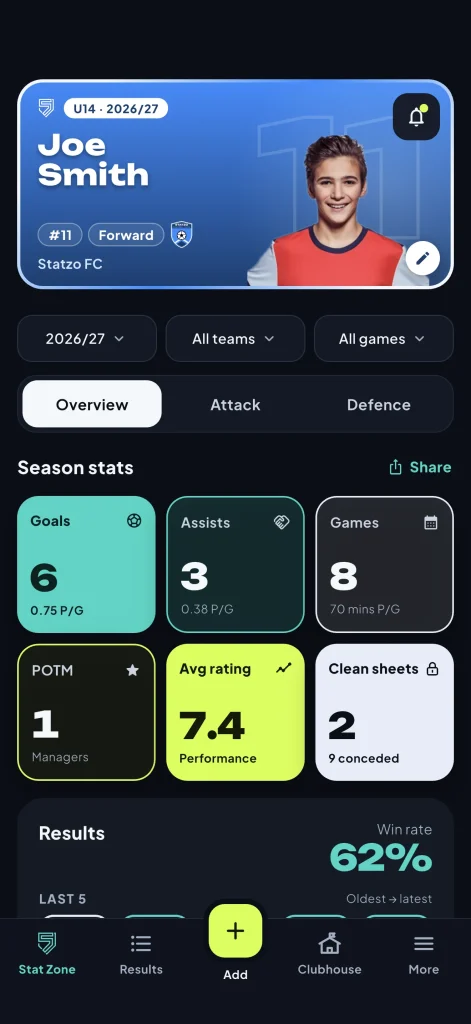
In our demo account, Joe (U14, Forward) has 6 goals, 3 assists and a 7.4 average rating from 8 games this season. Below that you’ll see:
- the season record (won, drawn and lost) and win rate;
- the last five results, oldest to latest;
- the current goal contribution streak, the number of games in a row he’s scored or assisted;
- Home v Away, so you can see where he plays best.
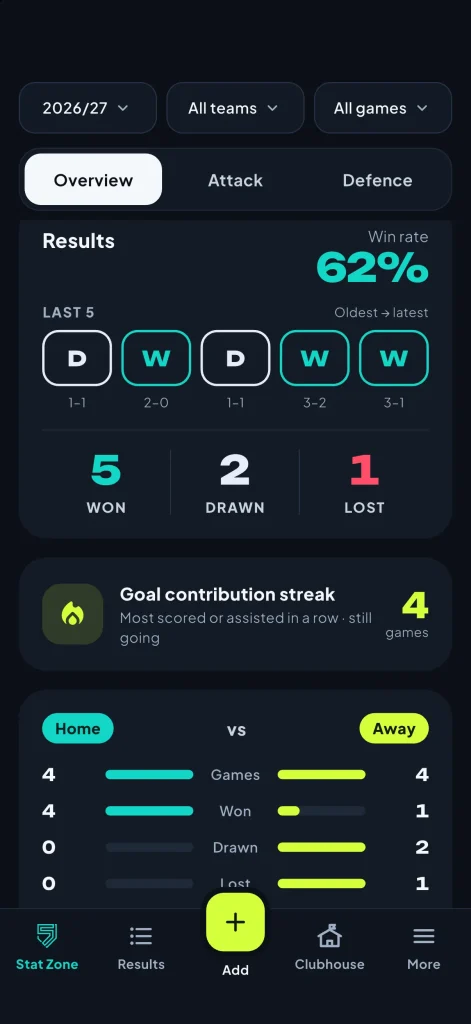
Filters let you look at one season, one team, home or away games, or league or cup games.
Tips to keep it going all season
- Do it in the car park. The details are freshest straight after the final whistle.
- Let your child do it. Players aged 13 and over can have their own account. Younger players are added by a parent.
- Keep it positive. Stats are there to celebrate progress, not to compare children or pile on pressure.
- Don’t worry about missing a match. Add it later. The date files it into the right season.
Keep every season, not just this one
The real value builds over time. Each season is kept, so you can look back at their first season next to their third. If they move up an age group or change clubs, nothing is lost. Everything adds up to one career record (see how to keep a record of your child’s football career).
Frequently asked questions
Is STATZO free?
Yes. STATZO is free to download and free for life for the season overview, results, adding matches, Player Cards and supporters. Every new account gets 14 days of Premium free, with no card needed.
Can I track more than one child?
Yes. A parent account holds up to 8 players, and you switch between them in a tap.
My child is under 13. Can they have their own account?
Under-13s are added by a parent on a parent account. Players aged 13 and over can have their own.
Does the rest of the team need the app?
No. You only log your own child’s matches.
What if I don’t know who got the assist?
Leave it out. Only the score is needed, and you can edit a match later.
Start tracking this weekend
Download STATZO free on the App Store or Google Play, add your child and their team, and log Saturday’s match before you leave the car park.
- Free to download
- 14 days of Premium free
- No card needed

